


Large canvas prints: how to choose size, quality & cost
Written by: Daniel Koren, Co-Founder, Frameology | Last updated: October 21, 2026
Key takeaways
Large canvas prints usually start at 24x36 inches, with 30x40 and 40x60 sizes creating the strongest wall presence.
Resolution drives sharpness: use the 150–300 DPI formula to confirm your photo has enough pixels before you order.
Gallery wrap suits modern rooms and framed canvas suits traditional spaces: Frameology offers both Premium Canvas Print and HD Framed Canvas.
Quality depends on canvas weight (350–420 GSM), stretcher bar depth, pigment-based inks, and UV protection that prevents sagging and fading.
Frameology combines large-format sizes up to 40x60, Giclée printing, clear pricing, and hand-framed-in-the-USA craftsmanship.
What counts as a "large" canvas print?
A large canvas print typically starts at 24x36 inches, which is big enough to anchor a wall. From there, 30x40 and 40x60 create real wall presence. These sizes read from across a room, fill the space above a sofa, and command a stairwell landing.
Choosing the right size starts with measuring the wall. A useful rule of thumb, widely cited in home decor guides, is to aim for artwork that spans roughly two-thirds of the furniture width below it. Leave 8 to 10 inches of gap between the furniture top and the bottom of the canvas. On a bare wall, aim for 60 to 75 percent of the available wall width. In stairwells, a staggered vertical arrangement usually works better than a single large piece. In open-plan rooms, larger canvases that seem oversized on the floor often look perfectly proportioned once hung.
Frameology's Premium Canvas Print, starting at $19, is available in sizes up to 40x60 inches. Canvas prints stay lightweight and renter-friendly, and you can hang them with damage-free mounting strips or velcro wall adhesives instead of permanent hardware.
Explore canvas sizes and formats at Frameology
What resolution do you need for a large canvas print?
Resolution is the most common reason a large canvas print looks soft or pixelated. The math stays simple once you know the formula: required pixels equal the print dimension in inches multiplied by the target DPI (dots per inch). For canvas, 150 DPI is the practical minimum for large prints viewed from typical wall distances, and 300 DPI is ideal for prints inspected up close. Canvas is more forgiving than glossy photo paper or metal because its woven texture softens minor pixel-level imperfections. Many professional printers note that 150 DPI on canvas looks comparable to 240–300 DPI on smooth paper.
Here is what that means in concrete pixel dimensions:
A 24x36 canvas at 150 DPI needs roughly 3,600 x 5,400 pixels. At 300 DPI, it needs roughly 7,200 x 10,800 pixels.
A 30x40 canvas at 150 DPI needs roughly 4,500 x 6,000 pixels. At 300 DPI, it needs roughly 9,000 x 12,000 pixels.
A 40x60 canvas at 150 DPI needs roughly 6,000 x 9,000 pixels. At 300 DPI, it needs roughly 12,000 x 18,000 pixels.
To check a photo's pixel dimensions: on a Mac, right-click the file in Finder and choose Get Info, then look for "Dimensions." On Windows, right-click the file, choose Properties, then the Details tab. In Photoshop, go to Image > Image Size, uncheck "Resample," and change the DPI field until the Document Size matches the canvas size you want to order.
If the file is too small for the size you want, you have a few options: choose a smaller canvas size, use an AI upscaling tool like Topaz Gigapixel AI or Adobe Photoshop Super Resolution, or pick a medium like canvas that hides softness better than glossy alternatives. Frameology recommends uploading photos at resolutions above 300 PPI for the sharpest results, and the frame builder flags low-resolution images before checkout. Frameology uses high-resolution Giclée printing for canvas, which delivers rich texture and gallery-level color reproduction.
Gallery wrap vs. framed edge: which should you choose?
Each canvas edge style works best in specific rooms and decor styles.
A gallery wrap is a canvas stretched over wooden stretcher bars where the printed image continues around the sides and fastens at the back, with no outer frame and no visible staples from the front. A gallery wrap works well when the room is modern or minimal, the image is dark or high contrast, the piece is large, or it is part of a multi-panel set where frames would break the image into boxes. It is also lighter than a framed equivalent, which makes it easier to hang on drywall.
A framed canvas places the stretched canvas inside an outer decorative frame. The frame can be a traditional molded frame or a floating frame that leaves a small visible gap between the canvas edge and the frame wall. Framed canvases suit traditional, transitional, and formal rooms, and they work well when the image is pale and needs a defined border to stand out from a light-colored wall.
A floating frame (also called a float frame) surrounds a gallery-wrapped canvas with a small visible gap so the wrapped edge still shows. This creates a gallery-style, editorial feel. A float frame covers nothing, so every millimetre of the painting stays visible, edges included.
Frameology's HD Framed Canvas, starting at $49, is the framed-edge option and delivers a finished, gallery-ready look with a floating frame border. Frameology's Premium Canvas Print, starting at $19, is the gallery wrap option. It comes with a finished back and stays lightweight, even at 40x60 inches.
How much should a 24x36 or 30x40 canvas cost?
Large canvas pricing varies based on material, frame depth, print technology, and what the listed price actually includes. Frameology's pricing stays transparent from the start. Here’s a breakdown of their large Premium Canvas Prints, by size:
24×36 Premium Canvas Print: $129
30×40 Premium Canvas Print: $189
40×60 Premium Canvas Print: $449
And here’s the pricing structure for their large HD Framed Canvas prints:
24×36 HD Framed Canvas: $195
30×40 HD Framed Canvas: $275
40×60 HD Framed Canvas: $549
One thing to watch when comparing prices: frequent discount cycles, upsells at checkout, and unclear material specs can make comparisons tricky. Always confirm whether the listed price includes stretching, what wrap depth the canvas uses, and whether the frame is included or an add-on before you place an order.
Compare transparent canvas pricing at Frameology
Quality signals to check before ordering a large canvas
A few key specs determine whether a large canvas arrives sharp, taut, and long-lasting. Focus on canvas material, frame construction and depth, ink type, UV protection, and whether the print is made to order.
Canvas material matters because heavier fabric holds tension better once stretched. For gallery wrap applications, a canvas weight between 350 and 420 GSM (grams per square meter) is typically ideal. Lighter materials sag more easily on larger sizes. Poly-cotton blends offer strong dimensional stability and are the dominant choice in professional labs, while 100% cotton canvas is the archival gold standard for fine art reproduction.
Frame construction is equally important. Poplar is the industry-standard stretcher bar wood, with kiln-dried poplar at 6–8% moisture content specified by many professional labs per ASTM D143. Frameology's canvas prints feature a 1.5-inch depth, which gives the canvas presence on the wall and helps resist warping over time.
Ink type drives longevity. Pigment-based inks sit on the canvas surface and resist UV degradation far better than dye-based inks. Dye-based inks retain only 38% of original cyan density after the equivalent of roughly 4.2 years under average home lighting, whereas pigment inks achieve ratings that translate to 85+ years before visible fading under museum lighting conditions. A UV-protective coating applied before stretching extends display life further and protects against everyday dust and scuffing.
Frameology has 30+ years of framing heritage, 1M+ frames sold, and 7,700+ verified 5-star reviews with a 4.98/5 star rating. Hunker named Frameology "best for budget-conscious shoppers" in a comparison of popular online custom framing services, and Reviewed.com praised Frameology for high-quality prints, affordable pricing, and fast shipping.
Why do some large canvas prints look blurry or pixelated?
Blurry large canvas prints usually come from one of three causes. The source file has too few pixels for the intended print size, the file was aggressively upscaled, or the file's effective DPI does not match the final canvas dimensions.
A photo can look perfectly sharp on a phone screen but turn soft or pixelated once enlarged to 24x36 inches or larger, because small files do not contain enough image data to fill a large canvas cleanly regardless of printing equipment quality. The same file that printed well as an 8x10 can look noticeably softer stretched across a 30x40 canvas. DPI describes a relationship between pixel dimensions and print size, not a fixed property of the file.
Three warning signs suggest a photo will not print well on large canvas. It came from a screenshot or messaging app (which compress images by 70–90%), zooming to 100% in editing software shows visible blur or blockiness, or the file size is unusually small for its claimed resolution. Images downloaded from social media platforms are almost always compressed well below print quality regardless of on-screen sharpness, so always use the original file from the camera roll or cloud backup.
The fix is to check pixel dimensions before ordering, choose the right canvas size for the file, and pick a printer that uses high-resolution Giclée printing instead of generic processes. Frameology's canvas prints use high-resolution Giclée printing for rich, textured results, and the frame builder flags low-resolution images before checkout so buyers know before they commit.
Common problems and how to avoid them
Most complaints about large canvas prints, including pixelated images, saggy canvas, flimsy frames, and surprise upsells at checkout, are avoidable with a few quick checks.
Pixelated prints come from under-resolved files. Verify pixel dimensions before ordering using the DPI formula, and always upload the original file instead of a social media download or screenshot.
Saggy canvas comes from thin stretcher bars, poor stretching tension, or lightweight canvas material. A poorly stretched canvas sags, wrinkles at the corners, and develops a wavy surface that distorts the image. Look for a vendor that specifies 1.5-inch stretcher bar depth, kiln-dried wood, and a finished back as signals of solid construction.
Flimsy frames are easy to spot by checking construction specs. A 1.5-inch depth creates a sturdier structure, and D-rings screwed into the frame are far stronger than sawtooth hangers glued or stapled to the back.
Surprise upsells at checkout frustrate many buyers. Frameology's pricing stays transparent, and the Premium Canvas Print, starting at $19, and the HD Framed Canvas, starting at $49, have no hidden add-ons.
Frameology's digital experience lets customers pick from a curated selection of timeless styles, upload a photo, and customize it on a single, intuitive interface. The mobile-only augmented reality (AR) preview lets customers project a true-to-scale preview of their exact frame or photo gift directly onto their own wall before buying, which reduces guesswork and returns.
A shortlist organized by use case
The right large canvas print depends on your wall, your file, and your budget. Here is how Frameology's options map to common needs.
For budget-friendly large canvas, the Premium Canvas Print, starting at $19, is the starting point. It’s available in sizes up to 40x60, with high-resolution Giclée printing and a finished back.
For photographer-grade large canvas, the HD Framed Canvas, starting at $49, delivers a gallery-ready framed presentation.
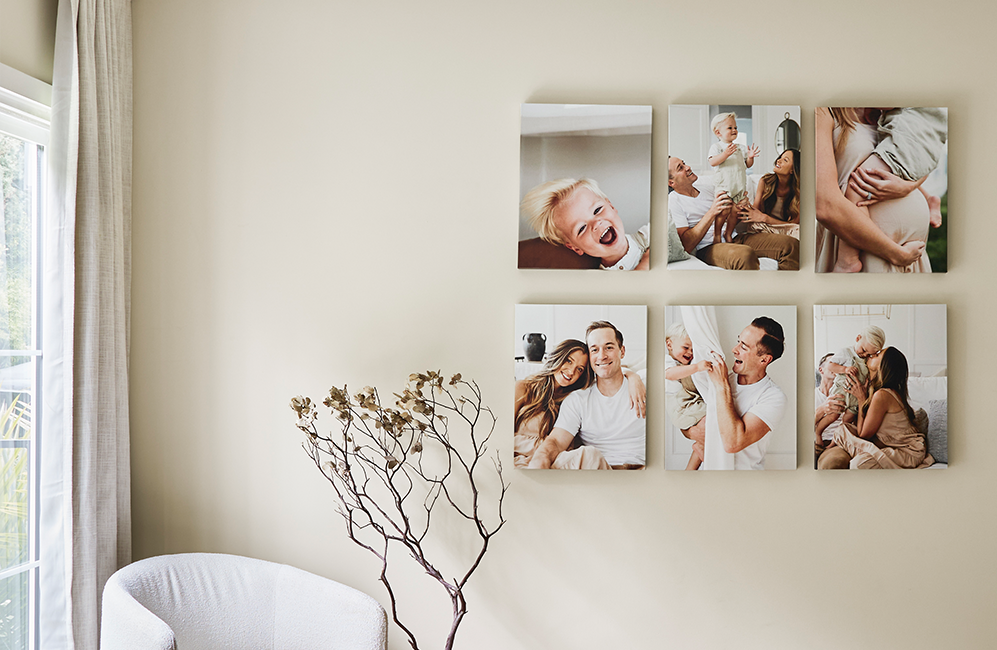
For gallery-style large canvas, Canvas Galleries, starting at $135, offer curated multi-canvas layouts for a cohesive, editorial wall arrangement. It’s important to note that Canvas Galleries do not include a gallery wall template, but they are compatible with damage-free adhesive strips for renter-friendly decor.
Find the right canvas for your space at Frameology
Shop large canvas prints with Frameology
The evaluation framework for any large canvas print comes down to five things: size, resolution, wrap style, budget, and quality signals. Size means the vendor offers the dimensions your wall needs. Resolution means your file has enough pixels for the canvas size you want. Wrap style covers gallery wrap for a modern look and framed edge for a more finished presentation. Budget covers whether the pricing is transparent and includes stretching, framing, and shipping. Quality signals include canvas material, stretcher bar depth, ink type, and UV protection.
The practical next steps are simple. Measure the wall, check the pixel dimensions of the image file using the DPI formula, shortlist the format that fits the room's decor, and compare options using this framework. Frameology covers every axis with sizes up to 40x60, high-resolution Giclée printing, clear pricing, fast shipping, and hand-framed-in-the-USA craftsmanship backed by 7,700+ verified 5-star reviews and a 4.98/5 star rating.
Start your large canvas with Frameology
Frequently asked questions
What resolution do I need for a 24x36 or 30x40 canvas print?
For most large canvas prints viewed from typical wall distances, 150 DPI is the practical minimum and 300 DPI is ideal for prints inspected up close. Canvas is more forgiving than glossy photo paper because its woven texture softens minor pixel-level imperfections, and 150 DPI on canvas often looks comparable to 240–300 DPI on smooth paper when viewed from a few feet away. Always check pixel dimensions before ordering and upload the original file instead of a social media download or screenshot.
What's the difference between a gallery wrap and a framed canvas?
A gallery wrap is a canvas stretched over wooden stretcher bars where the printed image continues around the sides and fastens at the back, with no outer frame. It creates a clean, modern, frameless look and suits minimalist or contemporary rooms. A framed canvas places the stretched canvas inside an outer decorative frame, either a traditional molded frame or a floating frame that leaves a small visible gap between the canvas edge and the frame wall. Framed canvases suit traditional, transitional, and formal rooms, and they work well when the image needs a defined border to stand out from the wall. Frameology's Premium Canvas Print is the gallery wrap option, and the HD Framed Canvas is the framed-edge option.
How long does shipping take for large canvas prints from Frameology?
Frameology's Classic products, including canvas prints, typically ship the next business day and arrive in less than a week. Luxe products take 7–10 business days because of their artisan craftsmanship. Most orders arrive within a week, which is faster than many competitors in the online custom framing space.
Do all gallery walls include hanging templates?
Classic and Luxe gallery walls include life-size gallery wall templates that make installation simple and straightforward. Canvas galleries, Metal galleries, and gallery walls created using Frameology's Gallery Wall Design Service do not include templates because their construction and customization work differently and often need more tailored installation approaches.
